
In this article (12 sections)
- Does TradingView have a demo account?
- How to open a demo account on TradingView
- How TradingView paper trading works
- How to place a paper trade on TradingView
- Virtual balance, currency, leverage and reset controls
- Live data vs delayed data in TradingView paper trading
- TradingView paper trading vs broker demo account
- TradingView paper trading vs live trading
- How to use paper trading for structured practice
- Worked example: one complete paper-trade workflow
- What TradingView paper trading cannot prove
- Frequently asked questions
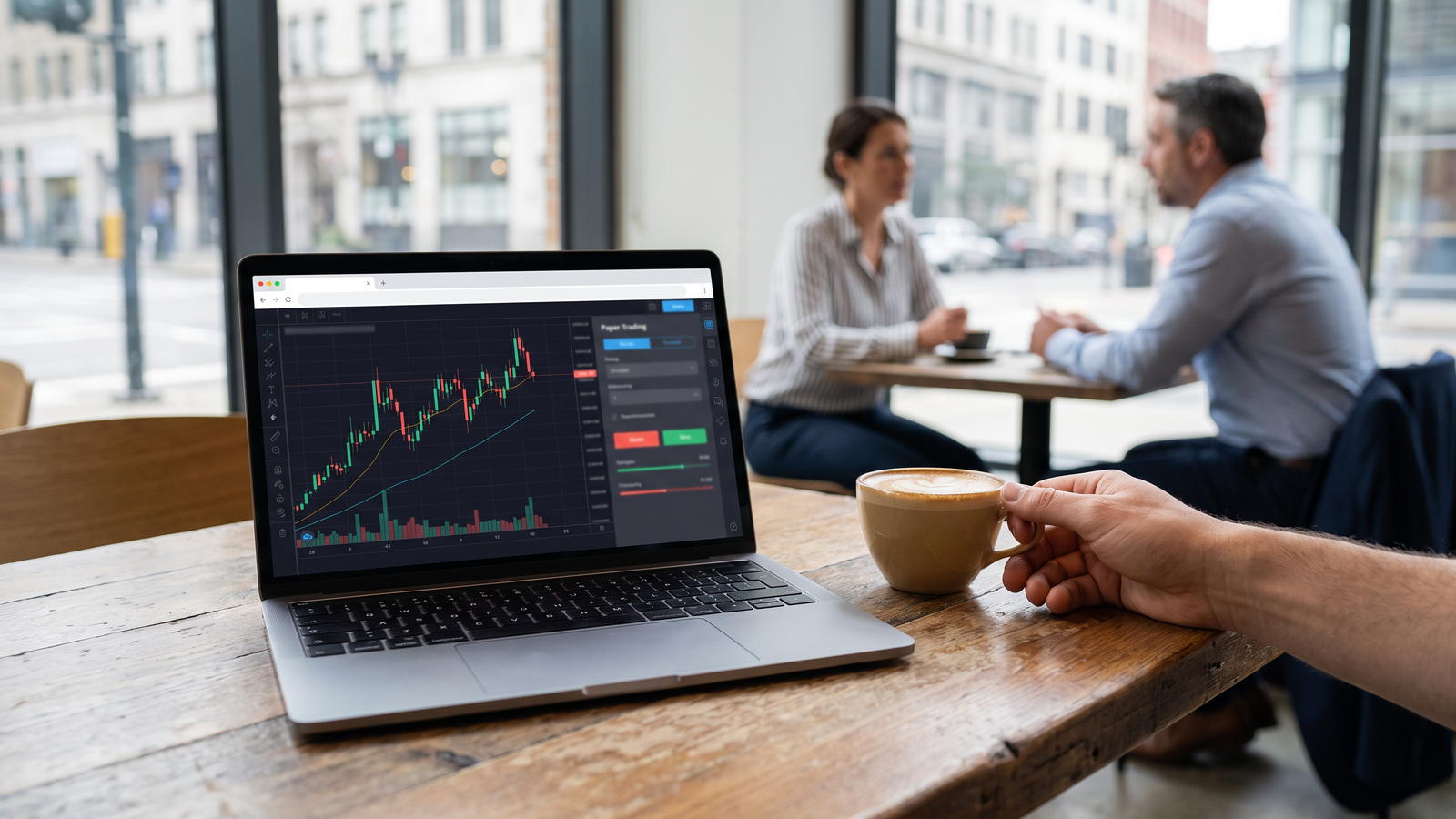
Yes. TradingView has a built-in demo environment called Paper Trading. It uses virtual funds and lets you place simulated orders directly from Supercharts without risking real money. You connect through the Trade/Trading Panel workflow, configure the paper account, and then practise order entry and position management. The important limitation is that market data and simulated fills can differ from a live broker account, so paper-trading results are not evidence of future live profitability.
Does TradingView have a demo account?
TradingView calls its built-in demo environment Paper Trading. It is a simulator attached to the TradingView platform rather than a funded broker account. TradingView currently states that Paper Trading is available to all users and can be connected from Supercharts. No real-money deposit is required to use the simulator.
Definition: A TradingView demo account is TradingView Paper Trading, a virtual-money simulator for practising order placement, chart trading and account management. It is separate from any demo account supplied by an integrated broker.
How to open a demo account on TradingView
TradingView’s current help flow is short and does not require opening a live broker account first:
- Open Supercharts in TradingView.
- Select Trade, or open the Trading Panel at the bottom of the chart.
- Choose Paper Trading from the available connections.
- Select Connect.
- Confirm the active Paper Trading account in the account manager and review the balance, currency, leverage and other settings before practising.
The exact interface can change, so menu labels should be rechecked against TradingView Help before publication. Paper Trading is the platform simulator; broker-specific demo logins are a separate feature controlled by each integrated broker.
How TradingView paper trading works
Paper Trading maintains a virtual account with simulated funds, orders, positions, margin information and history. After you place an order, the simulator records the order and any resulting position in the account manager. This makes it useful for practising the full workflow from order ticket to review, but the fill is simulated rather than an execution by a live broker or venue.
| Stage | What happens in Paper Trading |
|---|---|
| Configure | Choose account settings such as currency and leverage. |
| Place | Enter side, quantity, order type and optional stop-loss/take-profit levels. |
| Fill | TradingView simulates the order fill using its paper-trading rules and available data. |
| Manage | Monitor positions, orders, equity, margin and account metrics. |
| Review | Use history and the trading journal to inspect filled, rejected or cancelled orders and closed positions. |
How to place a paper trade on TradingView
- Choose the symbol you want to practise with and check whether its chart data is real-time or delayed.
- Confirm that Paper Trading is connected.
- Open the order ticket or use chart trading.
- Choose buy or sell, quantity and a supported order type such as market, limit or stop.
- Add stop-loss and take-profit levels if they are part of the practice workflow.
- Submit the simulated order and monitor it under Orders or Positions.
- After closing the trade, review the account history and journal rather than looking only at the virtual profit or loss.
Virtual balance, currency, leverage and reset controls
TradingView allows Paper Trading settings to be adjusted rather than forcing one permanent account configuration. The simulator supports account-currency selection and configurable leverage by asset class, and current TradingView documentation also supports multiple paper accounts. Leverage in Paper Trading models margin behaviour only; TradingView is not lending real funds or providing a live margin account.
Resetting or recreating a paper account can remove trading history, active orders and open positions. Before using a reset control, treat the account record as disposable unless you have already exported anything you want to keep.
Live data vs delayed data in TradingView paper trading
A live-looking chart does not prove that every symbol is using exchange real-time data. TradingView states that some markets require a separate real-time market-data subscription, while broker verification can also provide access to certain real-time feeds. The chart feed and a broker’s executable order feed are separate concepts.
| Data source | Possible timing | How to verify | Why it matters |
|---|---|---|---|
| TradingView chart feed | Real-time or delayed, depending on market and subscription | Check the symbol status and current market-data entitlement | Short-term practice can be distorted if prices are delayed. |
| Broker-verified data | May provide real-time access for supported exchanges | Connect and verify the broker account where supported | Broker data rights do not make Paper Trading a live execution environment. |
| Live broker order panel | Uses broker-side data and routing | Check the broker connection and order-panel feed | Executable quotes can differ from TradingView chart data and from simulated fills. |
TradingView paper trading vs broker demo account
| Area | TradingView Paper Trading | Broker demo | Live broker account |
|---|---|---|---|
| Who provides it | TradingView | Integrated broker | Broker / legal entity |
| Funds | Virtual | Usually virtual | Real money |
| Account rules | TradingView simulator settings | Broker-specific demo settings | Broker terms and regulation |
| Execution | Simulated | Broker-simulated or broker-defined demo execution | Live broker execution |
| Regulation relevance | Not a live brokerage account | Depends on future/live relationship | Depends on the exact broker/legal entity |
TradingView paper trading vs live trading
The interface can make practice feel realistic, but the economic environment is different. Real trading can introduce executable-liquidity constraints, slippage, latency, financing and broker-specific order handling, as well as the behavioural pressure of losing real money.
| Factor | Paper Trading | Live trading | Why the difference matters |
|---|---|---|---|
| Capital | Virtual funds | Real funds | Losses in a live account have real financial consequences. |
| Execution | Simulated fills | Broker-executed orders | Fill prices and partial fills can differ. |
| Spread | Based on simulator/data inputs | Broker/venue spread | Live spread can widen independently of the chart display. |
| Slippage & latency | Modelled or absent depending on simulator behaviour | Can occur in live markets | Requested and executed prices may differ. |
| Liquidity | No real market impact from your order | Available liquidity can limit fills | Order size and market conditions can affect execution. |
| Costs | Configurable simulation settings | Commission, financing and other broker charges | Paper P/L can overstate the live result if costs are omitted. |
| Behaviour | No real financial loss | Real gain/loss pressure | Decision-making can change when money is at risk. |
How to use paper trading for structured practice
- Use a realistic virtual balance rather than maximising simulated buying power.
- Choose leverage settings that make sense for the type of account you may later research, without treating the simulator as a recommendation.
- Define the order-entry and exit process before placing a trade.
- Record whether the market data is real-time or delayed.
- Note the displayed bid/ask spread and the simulator fill.
- Review losing trades and rule deviations, not only profitable trades.
- Repeat the same workflow across different market conditions.
- Treat platform fluency and strategy validity as separate questions.
Worked example: one complete paper-trade workflow
A UK user activates Paper Trading, chooses a GBP-denominated virtual account and selects EUR/GBP. The objective is to rehearse the workflow, not to maximise virtual profit.
- Check whether the selected EUR/GBP chart is using real-time or delayed data.
- Open the order ticket and choose a small hypothetical position size.
- Place a simulated market or limit order, then add stop-loss and take-profit levels.
- Close the position after the practice objective is complete.
- Record the displayed bid/ask relationship, spread, order type, simulator fill, equity change and data-feed status.
Interpretation: completing the sequence demonstrates familiarity with TradingView’s Paper Trading workflow. It does not show that a live broker would provide the same price, latency, liquidity or fill. Any virtual balance, position size or leverage in this illustration is purely hypothetical.
What TradingView paper trading cannot prove
- That a strategy will be profitable with real money.
- That a live broker will provide the same fill price or spread.
- That the displayed chart reflects the same executable liquidity available through a broker.
- That live latency, slippage or routing will match the simulator.
- That you will behave the same way when real capital is at risk.
- That a future live broker is authorised or appropriate for a UK user.
Turn Trading Calculations Into Real Trading Decisions
Use your calculated risk levels, position sizing, and technical analysis together with live forex trading signals and market commentary from The Forex Complex.

Frequently asked questions
Can I open a TradingView demo account without a broker?
Yes. TradingView’s own Paper Trading simulator can be connected from the Trading Panel without opening a real broker account. A broker demo is a separate account type and depends on that broker’s integration and regional availability.
How much virtual money does TradingView Paper Trading provide?
The virtual balance is an account setting rather than a reliable permanent universal number. TradingView allows users to configure or reset paper-account settings, so the current default should be checked in the live interface before publication.
Can I change the currency of my TradingView paper account?
Yes. TradingView documents account-currency controls for Paper Trading. Changing or resetting account settings can remove history, active orders and open positions, so check the current reset behaviour before using it.
Can I use leverage in TradingView Paper Trading?
Yes. Paper Trading supports configurable leverage by asset class. This simulates margin behaviour only; TradingView does not provide real margin lending through the paper account.
Why is TradingView Paper Trading data delayed?
Some exchanges require separate real-time data subscriptions. Check the symbol status and your current market-data entitlements. TradingView chart data and a broker’s executable quote feed are separate, so real-time chart access does not guarantee live-equivalent execution.
Does TradingView Paper Trading include spread?
Paper Trading uses bid/ask logic in its simulated account calculations, so spread can affect the paper result. Live spreads and execution can still differ from the simulator and vary by broker and market conditions.
Can I practise forex on TradingView Paper Trading?
Yes. TradingView states that Paper Trading supports forex along with other major asset classes. The simulator is still separate from choosing and opening a live forex account with a regulated broker.
Is profitable paper trading a sign I am ready to trade live?
It can show platform familiarity and consistent rule-following, but it does not establish future profitability. Live trading adds real financial risk, execution differences and behavioural pressure that Paper Trading cannot fully reproduce.

 Join Our Free Group
 Twitter