

In this article (15 sections)
- cTrader vs MT5: the key differences at a glance
- What are cTrader and MetaTrader 5?
- Execution: does cTrader or MT5 give better fills?
- Charting, timeframes and indicators
- Algorithmic trading: Expert Advisors vs cBots
- Backtesting and optimisation
- Copy trading: cTrader copy vs MetaTrader signals
- Depth of market and active trading tools
- Desktop, web and mobile experience
- Broker support, instruments and account conditions
- UK-specific checks before choosing cTrader or MT5
- Which platform fits which trading workflow?
- Worked example: choosing between two UK-facing accounts
- Frequently asked questions
- Final comparison
cTrader and MetaTrader 5 (MT5) are both broker-connected multi-asset trading platforms, but they differ most clearly in automation, charting, backtesting, copy trading and depth-of-market workflows. For UK traders, the platform itself does not determine FCA protection, spreads or execution quality. Those depend on the broker, legal entity, account and trading conditions.
cTrader vs MT5: the key differences at a glance
| Area | cTrader | MT5 | What to verify with your broker |
|---|---|---|---|
| Automation | cBots; C# or Python development; cloud and local instances | Expert Advisors (EAs) in MQL5 | Whether automated trading is permitted on the account and any hosting/VPS constraints |
| Backtesting | cBot backtesting and optimisation on Windows/Mac | Strategy Tester with multi-currency, local, remote and cloud agents | Historical-data source, costs, spread/slippage assumptions and model settings |
| Copy trading | cTrader Copy | MetaTrader Signals | Availability, account type, fees, execution differences and copying risk |
| Depth of market | Standard, Price and VWAP DOM where supported | Exchange DOM or broker-dependent OTC DOM | Whether meaningful depth/volume is supplied for the chosen instrument |
| Desktop / web / mobile | Web, Windows, Mac and mobile; cloud cBot instances manageable across apps | Desktop plus iOS/Android; mobile focused on trading/monitoring rather than EA development | Which features exist on the exact app and broker setup |
| Execution / pricing | Broker- and account-dependent | Broker- and account-dependent | Legal entity, spread/commission, routing, server location, slippage and fill policy |
What are cTrader and MetaTrader 5?
cTrader is a trading-platform ecosystem offered through participating brokers, with web, desktop and mobile applications. Its automation environment is built around cBots and custom indicators, and current official documentation supports cBot development in C# or Python on Windows and Mac.
MetaTrader 5 (MT5) is MetaQuotes’ multi-asset platform. Its desktop environment combines trading, charting, MQL5 Expert Advisors, custom indicators and the Strategy Tester, while mobile apps focus on account access, trading, charts and technical analysis.
In both cases, you need a broker account that supports the platform and the instrument/account type you want to trade. Choosing the software does not by itself choose the legal entity, prices or execution conditions.
Execution: does cTrader or MT5 give better fills?
Myth vs fact: Neither cTrader nor MT5 is inherently “ECN”, “STP”, faster, cheaper or more liquid. Those labels and outcomes depend on the broker, account model, servers, liquidity arrangements and instrument. The same platform can produce different effective fills at different brokers.
Orders entered through either platform are ultimately handled through the connected broker/trading server and the broker’s available pricing or venue setup. A useful comparison therefore separates interface features from execution conditions: the platform controls how you submit and manage an order; the broker/account controls the commercial and execution environment in which that order is handled.
This distinction is especially important for depth of market. MetaTrader’s official documentation explicitly notes that exchange DOM can show exchange prices and volumes, whereas OTC DOM can be built from broker quotes and broker-provided volume. cTrader DOM likewise depends on what the broker and instrument support. Neither platform creates a universal central order book for spot forex or OTC CFDs.
Charting, timeframes and indicators
Both platforms provide multi-chart technical-analysis workflows, built-in indicators, drawing tools and customisation. The practical difference is less about a single “better chart” and more about how the trader prefers to organise analysis and custom tools.
| Feature | cTrader | MT5 | Practical point |
|---|---|---|---|
| Built-in charting | Multi-chart layouts across cTrader apps; indicators and drawing tools | Desktop technical-analysis environment with 21 timeframes and up to 100 simultaneous charts documented by MetaQuotes | Compare the exact app you will use, not just desktop marketing pages |
| Custom indicators | Creation/editing is a desktop workflow on Windows/Mac | Custom indicators built in MQL5 on desktop | Existing code and developer skills can matter more than raw feature count |
| Mobile charting | Trading and chart monitoring in mobile apps | Mobile provides charts, orders, 30 indicators and 9 timeframes in current official help | Mobile capability is narrower than full desktop development environments |
| Usability | Preference-sensitive | Preference-sensitive | Test the workflow with your own watchlists, layouts and order process |
Algorithmic trading: Expert Advisors vs cBots
For automated forex trading, the key distinction is the code ecosystem rather than an assumed performance advantage.
MetaTrader 5 Expert Advisors
MT5 automated strategies are called Expert Advisors (EAs) and are written in MQL5. The desktop platform includes the MQL5 development environment, automated-trading controls and Strategy Tester integration. Existing MQL5 libraries, indicators and EAs can make MT5 the lower-friction choice for a workflow already built around that ecosystem.
cTrader cBots
cTrader automated strategies are called cBots. Current cTrader documentation supports development in C# or Python on Windows and Mac. cBot instances can run locally on Windows/Mac or as cloud instances; cloud instances can be managed from cTrader Web and Mobile as well as desktop apps. Creation, editing, backtesting and optimisation remain desktop workflows on Windows/Mac.
Can you move an EA or cBot between platforms?
Not directly. An EA is not a cBot, and platform APIs, event models, order functions and data access differ. The trading logic can often be recreated, but migration normally means porting or redevelopment, followed by fresh testing. A trader with a mature codebase should treat that migration cost as a real platform-selection factor.
| Feature | cTrader cBots | MT5 Expert Advisors | Important limitation |
|---|---|---|---|
| Primary languages | C# and Python | MQL5 | Language familiarity does not guarantee strategy quality |
| Create/edit | Windows and Mac | Desktop MT5 / MetaEditor | Not a full mobile coding workflow |
| Run | Local or cloud cBot instances | Desktop/VPS/hosted MT5 environment | Actual uptime depends on the chosen deployment |
| Portability | cBot-specific APIs | EA/MQL5-specific APIs | Code is not directly interchangeable |
Backtesting and optimisation
Both platforms support historical testing, but a backtest is only as useful as its data, assumptions and implementation. Spread, commission, slippage modelling, execution rules and parameter selection can materially alter the result.
| Capability | cTrader | MT5 | Why it matters |
|---|---|---|---|
| Backtest | cBots on historical data in Windows/Mac | Expert Advisors in Strategy Tester | Both are simulations, not live fills |
| Optimisation | Parameter optimisation in desktop Algo workflow | Slow complete / genetic optimisation | Optimisation raises overfitting risk |
| Multi-symbol | Depends on cBot design/data workflow | Strategy Tester supports multi-currency EAs | Required if the system trades or references multiple symbols |
| Compute scaling | Desktop testing; cTrader cloud is for running cBot instances, not the same as cloud backtest agents | Local, remote and MQL5 Cloud Network agents | Compare the actual workflow you need |
| Visual testing | Available in cTrader backtesting workflow | Strategy Tester visual mode | Useful for validation but not proof of robustness |
Backtest limitation: Historical or simulated performance does not predict future results. Before comparing outputs, align the data source, spread/commission assumptions, slippage model, session handling and parameter-search method.
Copy trading: cTrader copy vs MetaTrader signals
cTrader Copy is an integrated strategy-copying environment. Investors allocate funds to a separate copy-trading account, and current cTrader documentation uses an equity-to-equity model for copied volume. Availability, membership type, fees and instrument compatibility can still depend on the broker/account.
MetaTrader Signals is the MT5 ecosystem for subscribing to a provider’s trades through an MQL5.community account. Current MetaTrader documentation states that the subscribed trading account must remain connected; a VPS can be used for continuous copying. Subscription terms and compatibility should be checked before relying on the service.
| Feature | cTrader Copy | MetaTrader Signals | Risk / availability note |
|---|---|---|---|
| Access model | Integrated cTrader Copy environment | MQL5.community signal subscription | Broker/account compatibility still matters |
| Copying mechanics | Separate copy account; equity-to-equity sizing | Provider trades copied to subscriber account | Prices and fills can differ between provider and subscriber |
| Fees | Can include performance, management and volume fees depending on strategy | A subscription fee may apply | Historical provider results are not future-return evidence |
| Operational risk | Instrument/leverage/margin differences can prevent copying | Account connectivity and copying settings matter | Latency, sizing and account conditions can change outcomes |
Depth of market and active trading tools
cTrader can present multiple DOM views, including Standard, Price and VWAP views where supported. MT5 also provides Depth of Market, but its meaning depends on the instrument. MetaQuotes distinguishes exchange DOM from OTC DOM: OTC depth can be based on broker quotes and broker-provided volume, and the broker controls how many price levels are available.
For an active trader, the useful question is therefore not “which platform has the real forex order book?” but “what depth does my broker provide for this instrument, and how does the interface let me interact with it?”
Desktop, web and mobile experience
| Workflow | cTrader | MT5 | Key qualification |
|---|---|---|---|
| Desktop trading | Windows and Mac apps with charting and Algo workflows | Desktop terminal with full charting, EAs and Strategy Tester | Primary environment for advanced automation/development |
| Web | cTrader Web available; cloud cBot instances can be managed | Web access depends on MetaTrader web offering/broker integration | Feature parity should be checked for the exact broker setup |
| Mobile | Trading, charting and management of cloud cBot instances | iOS/Android trading, charts and analysis | MT5 mobile should not be treated as equivalent to desktop EA development/execution |
Broker support, instruments and account conditions
A broker decides whether it offers cTrader, MT5 or both, which legal entity provides the account, which instruments are available, and how that account is priced and executed. The same broker may also configure different symbols, commissions or product access across platforms.
- Compare the exact legal entity and account type, not just the broker brand.
- Check spreads, commissions, swaps, minimum trade size and symbol list on the specific account.
- Verify server location, execution policy and any fill/partial-fill rules if they matter to the strategy.
- Do not assume one platform means tighter spreads, lower latency or deeper liquidity.
UK-specific checks before choosing cTrader or MT5
For a UK retail trader, the key regulatory check is the financial-services firm or legal entity providing the account. When comparing FCA-regulated forex brokers, remember that cTrader and MT5 are software platforms; neither should be described as “FCA regulated”.
- Verify the exact firm/legal entity on the FCA Financial Services Register or Firm Checker and confirm that the permissions are relevant to the service offered.
- Confirm the entity is actually the one opening your account and, where relevant, that it is accepting new UK clients.
- For retail CFD/rolling spot FX products, check the protections attached to that relationship. Current FCA rules include leverage limits that vary by asset class, 50% margin close-out, negative balance protection, restrictions on inducements and standardised risk warnings.
- If professional-client classification or an offshore entity is offered, verify which protections would change before opting into it.
- Only after the entity, product access, pricing and protections are clear should interface preference become the deciding factor.
UK point: FCA protections attach to the regulated broker relationship, not to cTrader or MT5 as software. A familiar platform does not make an offshore or differently regulated account equivalent to a UK retail account.
Which platform fits which trading workflow?
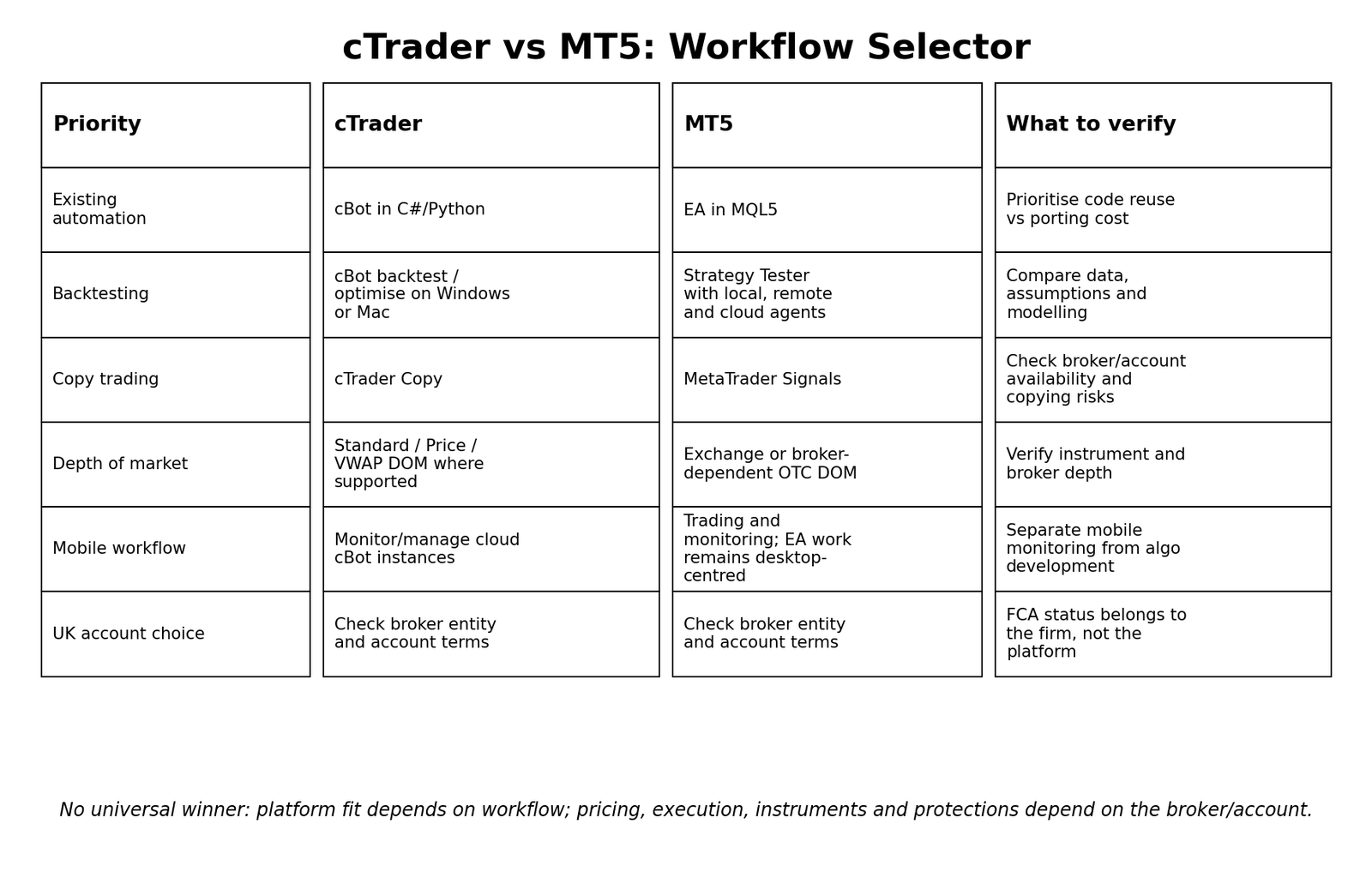
A useful decision process starts with constraints and existing assets rather than looking for a universal winner. The matrix below highlights what deserves closer inspection for different workflows.
Worked example: choosing between two UK-facing accounts
Assume a UK-based trader is comparing Broker A on cTrader with Broker B on MT5. The trader uses discretionary charts, occasionally runs an automated strategy and wants mobile monitoring. A cBot already exists in C#, but there is no MQL5 version.
- Verify Broker A and Broker B as separate legal entities, including FCA status, permissions, product access and account terms.
- Compare actual trading costs and execution conditions on the intended account, rather than assuming the platform determines them.
- For automation, reusing the existing C# cBot may reduce redevelopment work on cTrader. Moving the strategy to MT5 would normally require a new MQL5 implementation and validation.
- For historical testing, compare the available data and assumptions in each environment, not just headline backtest results.
- For 24/7 automation, compare the planned hosting model. cTrader cloud instances and an MT5/VPS workflow solve uptime in different ways and should be tested with the actual broker account.
- For mobile use, confirm that monitoring and trade management are sufficient; do not assume desktop development tools are replicated on mobile.
Interpretation: existing code and workflow can make one platform more convenient, but broker/entity protections, costs, instruments and execution conditions may outweigh that convenience. The example is a decision framework, not a recommendation for either platform or broker.
Turn Trading Calculations Into Real Trading Decisions
Use your calculated risk levels, position sizing, and technical analysis together with live forex trading signals and market commentary from The Forex Complex.

Frequently asked questions
Is cTrader better than MT5 for forex trading?
There is no universal winner. cTrader and MT5 differ in charting workflow, automation ecosystem, backtesting, copy trading and DOM presentation, while pricing and execution depend on the broker/account. The better fit depends on what you actually use and what the available broker entity offers.
Is cTrader or MT5 better for algorithmic trading?
cTrader uses cBots and currently supports C# and Python development on Windows/Mac. MT5 uses Expert Advisors written in MQL5. Existing code, developer skills, testing requirements and deployment needs are more useful decision criteria than an overall ranking.
Can cTrader cBots run on mobile?
Current cTrader documentation allows cloud cBot instances to be managed from cTrader Mobile and Web, while creating, editing, backtesting and optimising cBots remains a Windows/Mac workflow. Recheck the current app documentation before publication because capabilities can change.
Can MT5 Expert Advisors run on mobile?
MT5 mobile apps are designed for account access, trading, charts and technical analysis. Do not treat them as equivalent to the desktop environment used to develop, test and run Expert Advisors. For continuous automation, traders commonly use a desktop/VPS-style setup.
Which platform has better depth of market?
A universal answer would be misleading. The interfaces differ, but actual depth depends on the instrument and broker. In OTC forex/CFDs, displayed depth may be broker-supplied rather than a central market-wide order book.
Are cTrader and MT5 FCA regulated?
No. FCA authorisation applies to the financial-services firm or legal entity providing the account, not to the trading-platform software. UK traders should verify the broker entity and permissions on the FCA Financial Services Register or Firm Checker.
Does MT5 have copy trading?
Yes. MetaTrader Signals allows users to subscribe to providers through an MQL5.community account, subject to the service rules and account compatibility. Copying still carries execution, sizing, latency and strategy risk.
Can I move from cTrader to MT5?
You can open a compatible MT5 account with a broker that offers it, but platform-specific assets do not usually transfer directly. cBots, Expert Advisors, custom indicators and templates may need to be recreated or ported, and any automated strategy should be retested after migration.
Final comparison
cTrader vs MT5 is best treated as a workflow decision rather than a contest with one permanent winner. cTrader can be attractive to traders whose automation work is already in C#/Python or who value its current cloud cBot model and integrated Copy workflow. MT5 can be attractive to traders already invested in MQL5 EAs, MetaTrader Signals or the Strategy Tester ecosystem. In either case, a UK trader should verify the broker entity, account conditions, instruments, pricing and protections before letting interface preference decide the account.




 Join Our Free Group
 Twitter